
DFD (Data Flow Diagram):
A DFD, also known as a Data Flow Diagram, is one of the most important tools in Business Analysis, System Design, Software Engineering, and even Full Stack Development. It helps you understand how data moves inside a system. If you are a student, developer, business analyst, or someone learning system analysis, you will find DFDs very helpful because they show the entire system in a clear graphical representation.
In simple words:
A DFD illustrates how data enters a system, how it flows, how it is transformed, and where it is ultimately stored.
This is why DFDs are used in system documentation, process planning, and application design. They provide a simple visual representation of complex systems, such as banking apps, e-commerce platforms, hospital systems, or any other digital workflow.
What is the full form of DFD?
DFD full form = Data Flow Diagram
It means a diagram that shows the flow of data in a system.
Why is DFD (Data Flow Diagram) important?
A DFD makes system understanding very easy. When developers and analysts work together on a project, a DFD helps them stay on the same page. It reduces confusion and allows teams to make better decisions about the structure, process functions, data stores, users, and system workflow.
DFDs are also used to:
- Build clear system analysis reports
- Identify missing requirements
- Understand process functions
- See logical data flow
- See physical data flow
- Improve software design
- Explain systems to non-technical people
This is why DFDs are very popular in software engineering, full-stack development, business analysis, and system documentation.
Main Components of a DFD
A data flow diagram uses standard symbols to show the system. The four main components are
1. External Entity
These are people, departments, or systems that send or receive data.
Example: Customer, Bank, Admin, Supplier.
2. Process / Function
These show how data is transformed.
Example: “Verify Login,” “Create Order,” “Update Profile.”
3. Data Store
These are places where data is kept for later use.
Example: Database, Files, Tables.
4. Data Flow
This shows how data moves between processes, stores, and entities.
Example: “User Input,” “Payment Data,” “Order Details.”
These four components create the complete logical and physical data flow of a system.
Different Levels of DFD
DFDs follow a hierarchical structure, meaning they start simple and become more detailed step by step.
Level 0 DFD (Context Diagram)
- Shows the entire system in one single process
- Very high-level
- Includes main external entities and main data flows
Level 1 DFD
- Breaks down the main process into sub-processes
- Shows more detail and internal flows
Level 2 and Beyond
- More detailed processes
- Useful for software design and documentation
This step-by-step breakdown helps developers understand both the big picture and the deep workings of a system.
Types of Data Flow in a DFD
There are mainly two types:
1. Logical Data Flow
- Focuses on what happens in the system.
- Shows business functions, user roles, and logic.
2. Physical Data Flow
- Focuses on how the system is implemented.
- Shows actual hardware, software, storage, and data movement.
- Logical DFDs are used during planning.
- Physical DFDs are used during development.
How to Draw a DFD (Simple Step-by-Step Guide)
Drawing a DFD is easy if you follow these steps:
Step 1: Identify external entities
Example: Customer, Admin, Payment System.
Step 2: Identify all main processes
Example: Login, Order Processing, Report Generation.
Step 3: Identify data stores
Example: User Database, Product Database, Transaction Files.
Step 4: Connect them with data flows
Use arrows to show how data moves.
Step 5: Start with Level 0
Make one process representing the whole system.
Step 6: Expand with Level 1 and Level 2
Break processes into smaller parts for better clarity.
Step 7: Keep the diagram clean
Use clear labeling, simple lines, and neat structure.
With practice, anyone can draw professional DFD diagrams.
Advantages of DFD (Data Flow Diagram)
DFDs offer many benefits, especially for developers and analysts.
1. Easy to understand
Shows the system visually.
2. Great for communication
Helps teams understand requirements without confusion.
3. Shows processes clearly
Displays how data is transformed at each stage.
4. Identifies missing details
Makes it easy to spot errors or weak points.
5. Useful for system documentation
Creates reports for future developers.
6. Supports better system design
Helps in planning system architecture and flowcharts.
7. Saves time and cost
Reduces rework by clearing confusion early.
Disadvantages of DFD
Even though DFDs are helpful, they also have some limitations:
1. Can become complex
For large systems, diagrams may look too detailed.
2. No decision logic
Does not clearly show conditions or loops.
3. No timing information
Cannot represent when a process happens.
4. Requires experience
Beginners may draw incorrect data flows.
5. Not ideal for modern agile systems
Sometimes flow charts or UML diagrams give better detail.
Where Are DFDs Used?
DFDs are used in many areas, including:
- Business Analysis
- System Design
- Web & App Development
- Full Stack Development
- Database design
- Software Engineering
- Requirement gathering
- Process improvement
- Academic project reports
Almost every software project uses DFDs at some point.
Examples of DFD in Real Life
1. Online Shopping System
Customer → Browse → Add to Cart → Payment System → Order Confirmed → Admin → Delivery
2. Banking System
User Login → Account Verification → Balance Check → Database → Transaction Processing
3. Hospital System
Patient Registration → Doctor Assignment → Medical Record Store → Pharmacy
These examples show how easy it is to understand complex systems through DFDs.

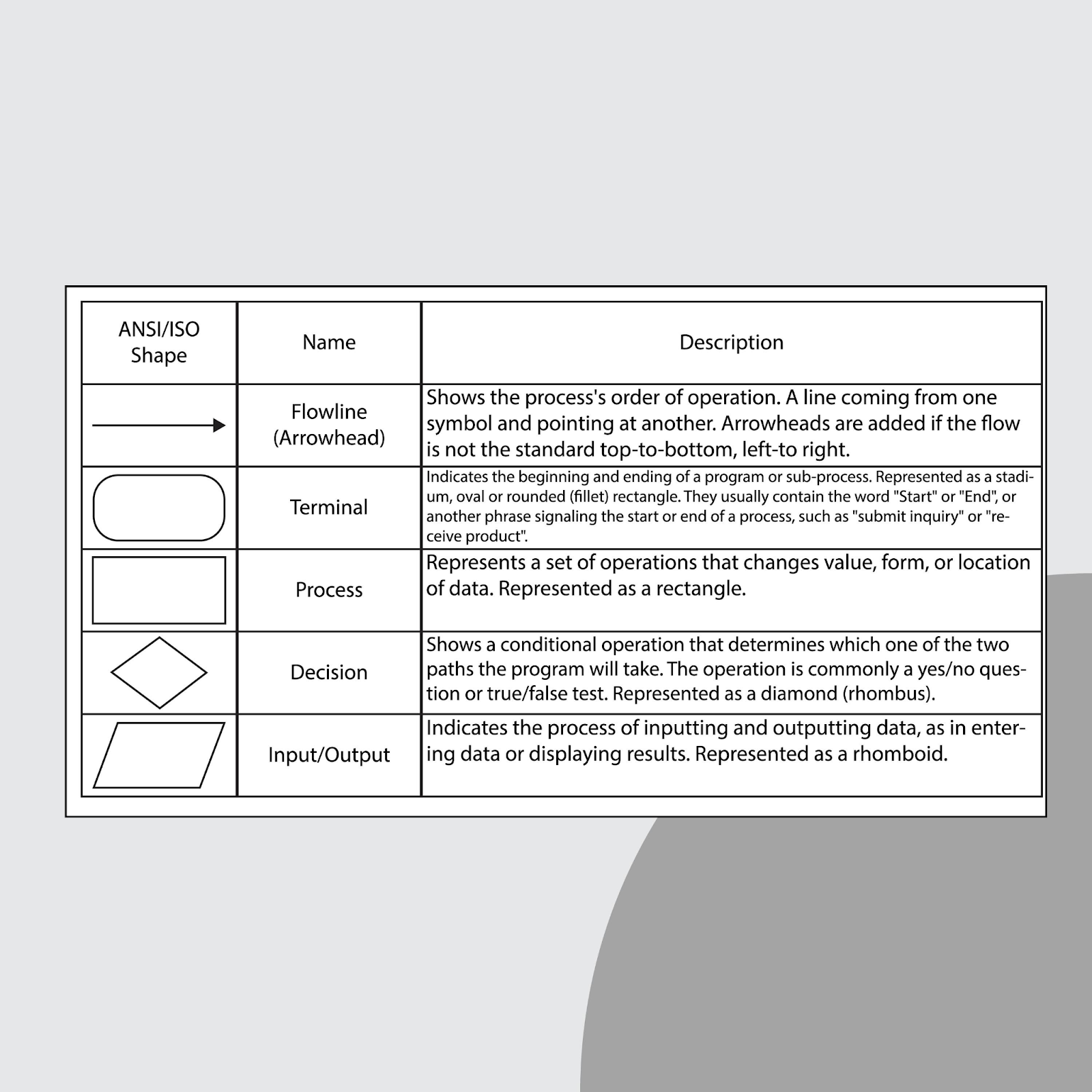
DFD vs. Flow Chart: What’s the Difference?
A DFD and a flowchart may look similar, but they serve different purposes.
- DFD: Focuses on data movement. It is mainly used in system analysis to show how data flows and transforms inside a system. It is abstract and high-level.
- Flow Chart: Focuses on process steps and logic. It is used in programming logic and shows detailed decision-making steps.
Conclusion: A DFD gives a better picture of how data moves, while a flow chart helps explain how decisions are made.
FAQ
1. What is DFD (Data Flow Diagram)?
A DFD is a simple graphical representation that shows how data moves inside a system. It includes processes, data stores, external entities, and data flows.
2. How to draw a DFD diagram?
Start by identifying external entities, processes, and data stores. Draw arrows for data flow. Begin with Level 0 and then expand into Level 1 and Level 2 diagrams.
3. How many types of data flow are there?
There are mainly two types: logical data flow and physical data flow.
4. How do you explain data flow?
Data flow means how information enters the system, how it moves through processes, how it changes, and where it gets stored.
5. What are the 4 components of a DFD?
The four components are
External Entity, Process, Data Store, and Data Flow.
Conclusion
A DFD (Data Flow Diagram) is a powerful tool for visualizing how data moves inside a system. Whether you are a business analyst, software engineer, student, or working in full-stack development, understanding DFDs helps you design better systems, create better documentation, and improve workflow clarity.
Using simple symbols and a clear hierarchical structure, DFDs make complicated systems easy to understand. With the right steps, anyone can learn how to draw, read, and use DFDs effectively.
If you want your project, app, or analysis to be strong, start with a good data flow diagram—it will guide your entire system design smoothly.