If you want to make clean, sharp, and professional designs, Adobe Illustrator is one of the best software tools available today. Many people search for “illustrator meaning,” “illustrator design,” or “illustrator software” to understand what this tool actually does. In simple words, Adobe
Illustrator helps you create vector graphics — graphics that stay clear even when you zoom in a lot. This makes the software perfect for logo design, digital illustration, posters, UI icons, branding, and many other creative uses.
This guide explains Adobe Illustrator uses, features, pricing, key tools, system requirements, and why it is so important for graphic designers in India. You will also learn about Vector vs Raster graphics, the role of Generative AI in Illustrator, and how beginners can start easily.
What is Adobe Illustrator?
Adobe Illustrator is a professional vector graphics software used to create designs that are smooth, scalable, and high-quality. Unlike normal images that blur when enlarged, Illustrator designs stay sharp because they are built from mathematical paths, not pixels.
People use Adobe Illustrator for:
- Logo design
- Vector art
- Digital illustration
- Icons and UI elements
- Print design
- Social media graphics
- Infographics
- SVG files (Scalable Vector Graphics)
So the simple illustrator meaning is: a tool used to create beautiful designs using vectors.
Why Adobe Illustrator Is So Popular
Today, almost every designer knows about Adobe Illustrator because it offers:
- Clean and professional vector control
- Industry-standard design workflow
- Fast editing tools
- High-quality output for print and web
- Integration with Photoshop, Adobe XD, InDesign, and AI tools
Whether you are a beginner or a professional, Illustrator helps you take your illustrator design skills to the next level.
Major Uses of Adobe Illustrator
Here are the most common uses of Adobe Illustrator in simple language:
1. Logo Design
Logos must be high-quality and scalable. Illustrator’s vector system helps create logos that look clean at any size.
2. Digital Illustration
From simple drawings to complex artwork, Adobe Illustrator art is widely used in digital illustration, character design, and comic art.
3. Branding & Marketing Materials
Designers use Illustrator for:
- Brochures
- Business cards
- Flyers
- Posters
- Banners
4. UI & Web Graphics
UI designers create icons, buttons, and SVG elements using Illustrator.
5. Product Packaging
Packaging needs sharp lines and perfect alignment — Illustrator makes this easy.
6. Print-Friendly Designs
Because Illustrator supports CMYK colors, print designs come out clean and professional.
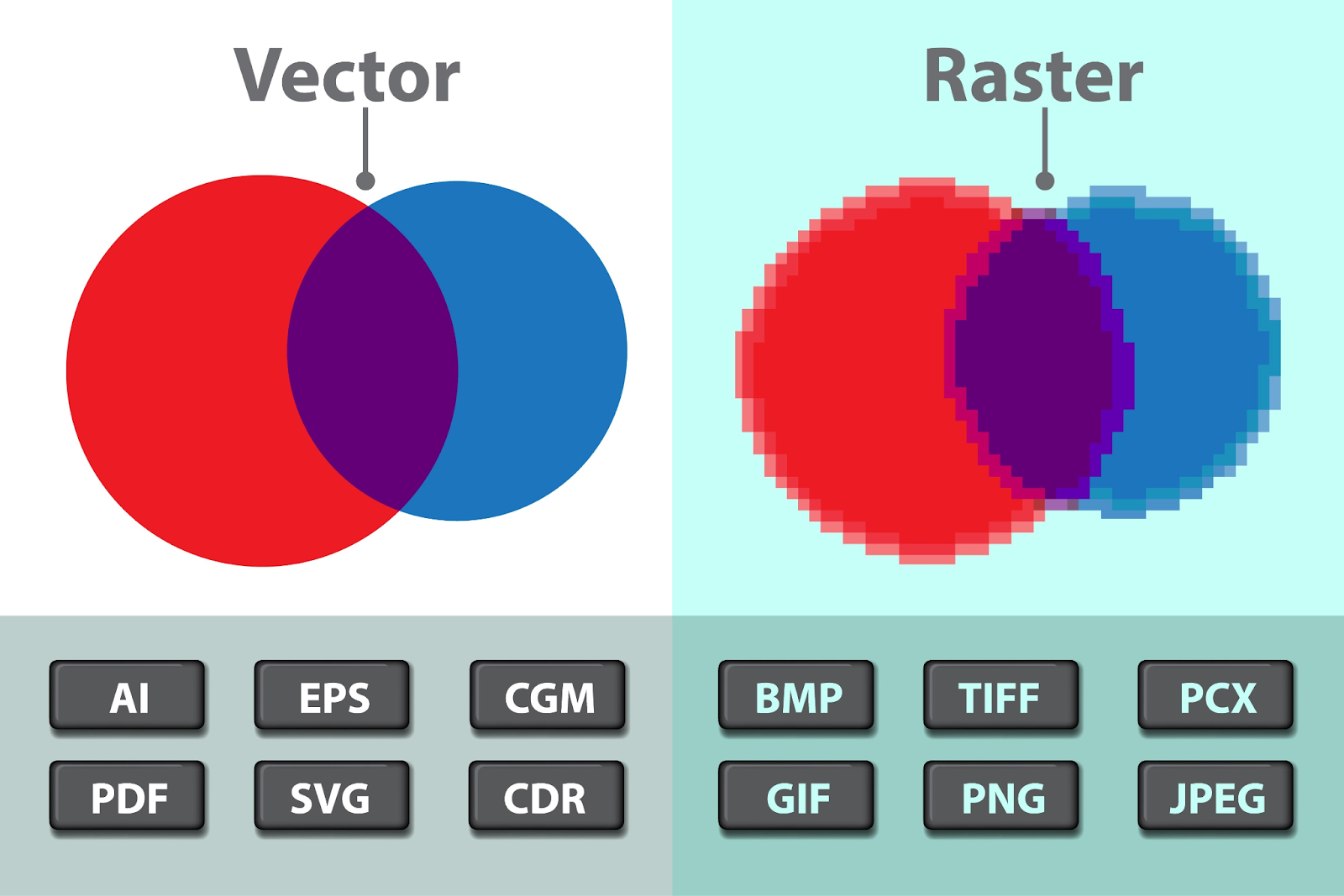
7. Vector vs Raster Graphics Explained
Illustrator works with vector graphics, which are made of paths and can scale without losing quality.
Photoshop works with raster graphics, which are pixel-based and may blur when enlarged.
This is why vector tools are better for:
- Logos
- Illustrations
- Icons
- Large banners
Key Adobe Illustrator Features
Here are some simple but powerful Adobe Illustrator features:
1. Pen Tool
The most powerful tool for creating clean shapes, curves, and paths.
2. Shape Builder Tool
Helps you merge or subtract shapes to create perfect designs.
3. Gradient Tool
Adds smooth colors that blend perfectly.
4. Brushes
Useful for artistic drawings and custom style strokes.
5. Layers Panel
Organize your artwork easily using separate layers.
6. Type Tool
Helps create stylish text designs, typography art, and logo text.
7. Image Trace
Converts a raster image into a vector design.
8. Artboards
Create multiple pages or screens in a single Illustrator file.
9. Generative AI in Illustrator
Adobe has added AI tools like:
- Auto-coloring
- AI pattern generation
- Smart retouch
- Shape suggestions
AI makes Illustrator faster, smarter, and beginner-friendly.
Adobe Illustrator for Beginners: Is it Easy?
Many beginners search “Adobe Illustrator for beginners,” and the answer is yes — Illustrator becomes easy when you learn the basics first. Start with:
- Shapes
- Pen tool
- Colors
- Stroke & fill
- Layers
- Type tool
Once you understand these, everything becomes simple. The software is deep, but easy step-by-step practice helps you master it.
Adobe Illustrator Pricing
Adobe Illustrator comes with different pricing options. As of the latest updates, Adobe provides monthly and annual plans.
Here is a simple breakdown of Adobe Illustrator pricing:
- Single App Plan – Illustrator only
- Adobe Creative Cloud All Apps – Illustrator + Photoshop + Premiere Pro + more
- Student Plans – Cheaper price for students
- Business Plans – For teams
You can pay monthly, yearly, or yearly billed monthly based on your budget.
Adobe Illustrator System Requirements
Before installing Illustrator, check these simple system requirements:
For Windows
- Windows 10 or later
- Minimum 8 GB RAM (16 GB recommended)
- Intel/AMD processor
- GPU with 1 GB VRAM
- At least 2–4 GB free space
For macOS
- macOS 11 or later
- Minimum 8 GB RAM
- Apple Silicon or Intel processor
- Enough free storage
Illustrator works best on systems with good RAM and a decent graphics card.
Career Scope of Illustrator & Graphic Design in India
The demand for graphic designers in India is increasing because of:
- Digital marketing growth
- Branding needs
- UI/UX design
- E-commerce boom
- Social media branding
- Gaming and entertainment
With expertise in vector graphics software, designers can work as:
- Graphic designer
- Illustrator artist
- Logo designer
- UI/UX designer
- Branding expert
- Digital illustrator
- Print designer
Many companies hire designers skilled in Adobe Illustrator because vector design is required in almost every field.
Illustrator Vector Design (Why Vectors Matter)
Vector designs allow you to:
- Resize without losing quality
- Print in big sizes
- Export in SVG, PDF, EPS
- Edit designs easily
- Make clean and sharp artwork
Illustrator is considered the best tool for vector graphics design because of its accuracy and flexibility.
Difference Between Photoshop and Illustrator
Many beginners get confused about these two. Here is a simple explanation:
Photoshop
- Raster graphics
- Best for photos
- Used for editing, retouching, and image manipulation
Illustrator
- Vector graphics
- Best for logos, illustrations, icons
- Used for design creation
Both software are powerful, but Illustrator is better for clean artwork while Photoshop is best for photo editing.
FAQs
1. What is Adobe Illustrator & What is it Used For?
Adobe Illustrator is a vector graphics software used to create logos, icons, illustrations, and scalable artwork. It is used for branding, marketing, digital illustration, print designs, UI graphics, and professional vector design.
2. Why Every Graphic Designer Needs Adobe Illustrator?
Graphic designers need Illustrator because it creates clean, scalable vector designs. It is the industry standard for logo design, icons, branding, and print graphics.
3. Difference Between Photoshop and Illustrator?
Photoshop is pixel-based and used for photo editing, while Illustrator is vector-based and used for creating artwork, logos, and illustrations that stay sharp at any size.
4. Is Adobe Illustrator Hard to Learn?
Adobe Illustrator is not hard if you learn step-by-step. Start with shapes, colors, layers, and the pen tool. With practice, even beginners can master it easily.
Conclusion
Adobe Illustrator is one of the most powerful tools for illustrator design, vector art, digital illustration, logo creation, and UI graphics. Whether you are a beginner or a professional, learning Illustrator gives you a strong advantage in today’s design world. It is the key to making clean, scalable, and high-quality artwork. Brillica Services is the Best institute for UI/UX design.